> For the complete documentation index, see [llms.txt](https://jeff-world.gitbook.io/jeff-world/llms.txt). Markdown versions of documentation pages are available by appending `.md` to page URLs; this page is available as [Markdown](https://jeff-world.gitbook.io/jeff-world/introduction/how-to-play-jeff-world/gate-transfer-base.md).
# Gate: Transfer (BASE)
Use JEFF World's **Gate: Transfer** feature to easily transfer your assets between your JEFF Wallet and personal wallets.
## ✅ Requirements (Before You Begin)
* Ensure you have a small amount of **$JEFF** tokens (0.5-1 $JEFF recommended) for gas fees in your JEFF Wallet.
* Prepare a small amount of **Base ETH** (for transaction gas fees) in your Personal Wallet.
* Set up your **2nd Password** on JEFF World (**Mypage → Settings**).
* For NFTs, ensure they have been **Exported** within JEFF World first.
* Check $JEFF, NFTs Contract Address(CA)
* $JEFF (BASE): **0x87682C4813B7d43447C6dcb8eD6b4a599C9CEC7E**
* AKDONG NFT (BASE): **0x967A6a62ccFEd34A34623A14Ac0C125B697D0a8A**
* LAND NFT (BASE): **0x75f9002B6F4D8aaE44274CEB912632a75abA4505**
## 🔷 JEFF Wallet → Personal Wallet
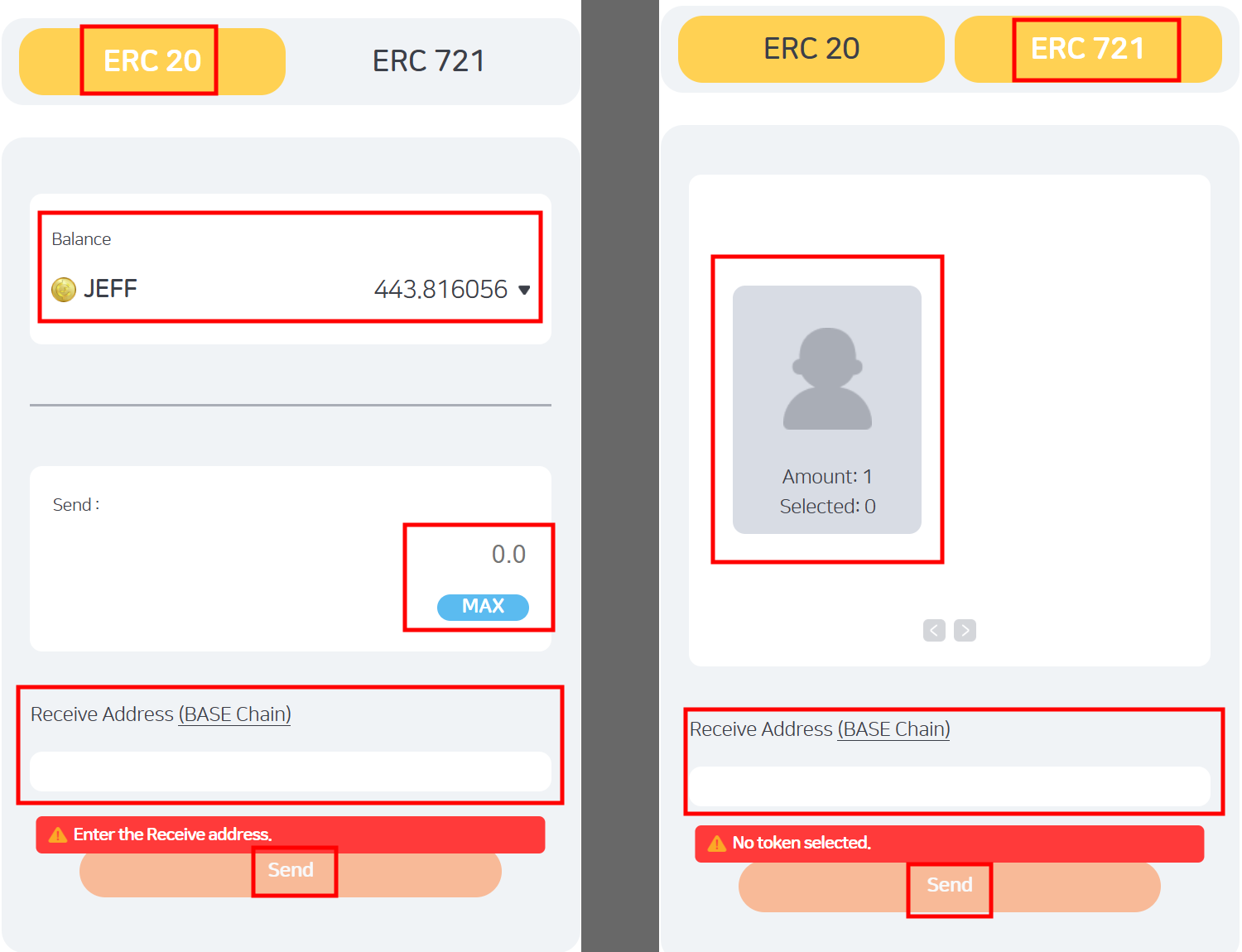
1. Navigate to [**Gate: Transfer**](https://gate.jeffworld.io/transfer/), then select **ERC-20 ($JEFF)** or **ERC-721 (NFT)**.
2. Check your available **balance of $JEFF or NFTs** in youruu JEFF Wallet.
3. Enter the **amount** or select the **asset** you wish to transfer.
4. Enter the recipient address (**BASE chain**).
* Usually your personal MetaMask wallet address.
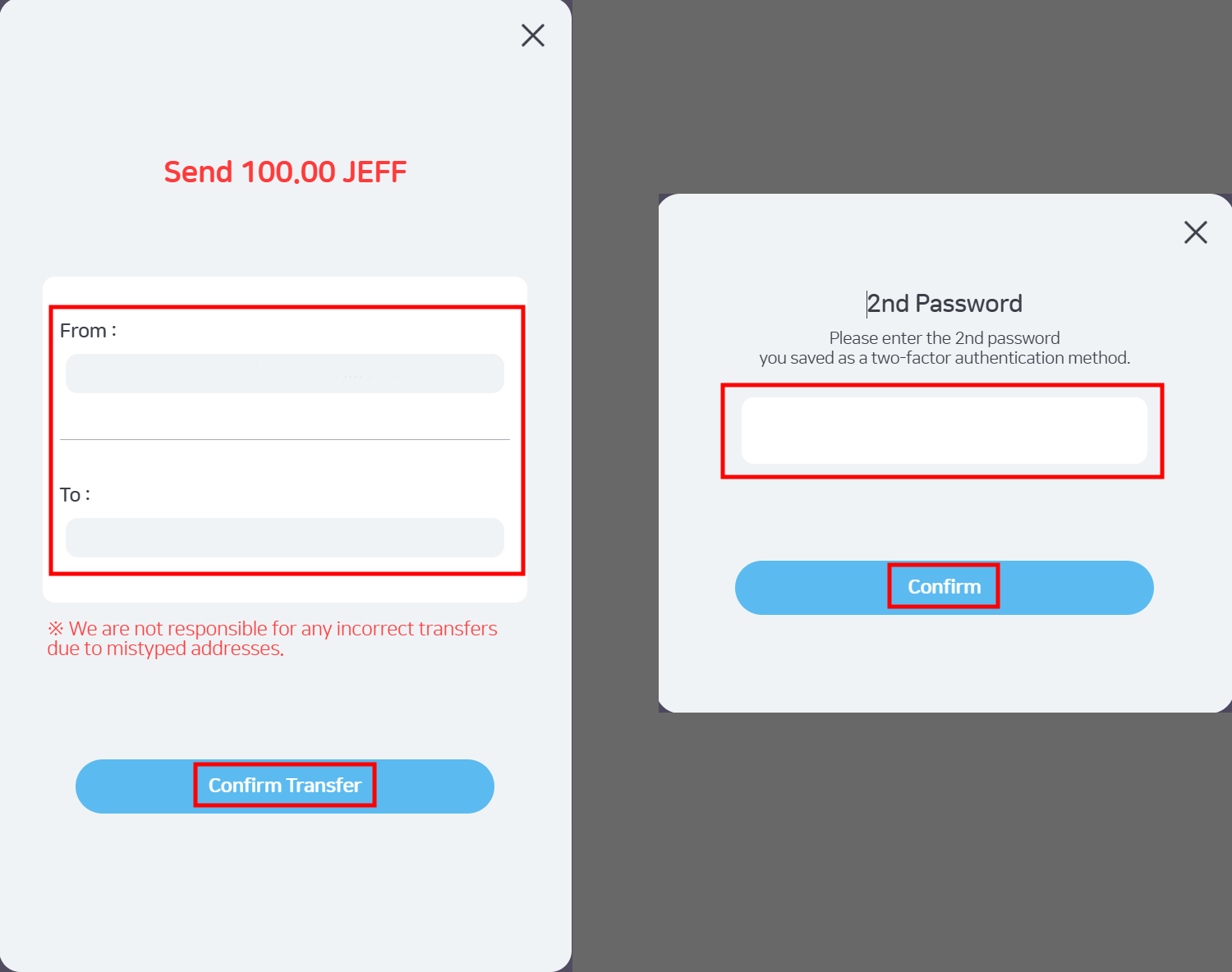
5. Click **\[Send]**, double-check the address, then click **\[Confirm Transfer]**.
6. Enter your **2nd Password**, click **\[Confirm]**, and wait for the transaction to complete.
## 🔷 Personal Wallet → JEFF Wallet
1. First, ensure your assets are imported and visible in MetaMask:
* ($JEFF): Open MetaMask → Tokens Tab → Dot Menu → \[Import Tokens] → Custom Token Tab → Enter Contract Address (Token Symbol & Decimals auto-fill) → Click Next → Confirm
* (NFT): Open MetaMask → NFTs Tab → \[Import NFT] → Enter Contract Address & Token ID → Click Import.
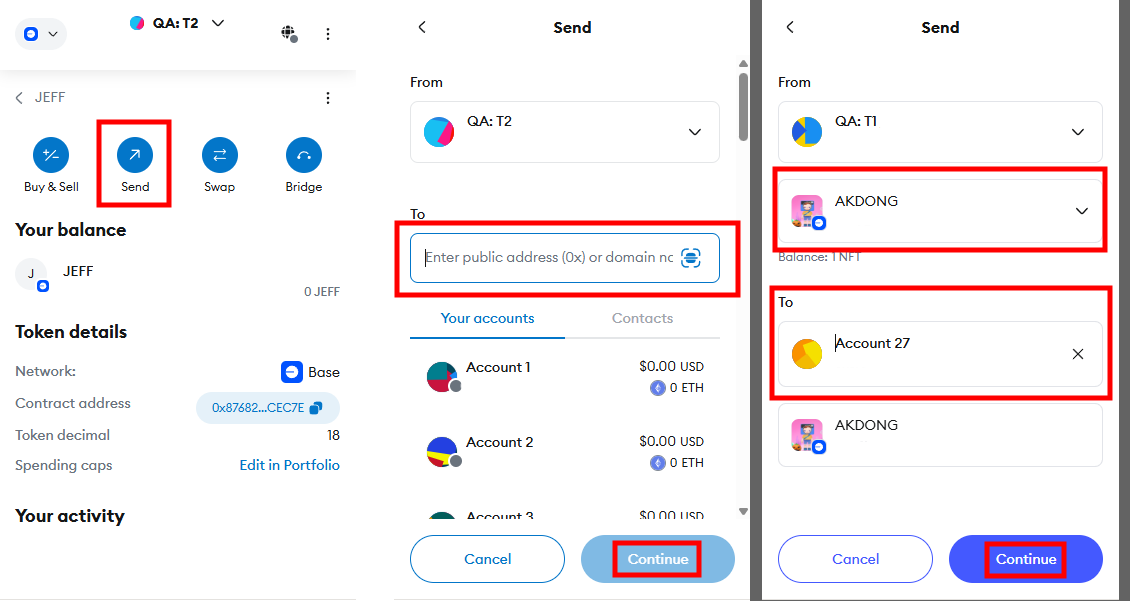
1. In MetaMask, select the asset, then click **\[Send]**.
2. Input your **JEFF Wallet** address in the recipient field (**To**).
* **Ensure the address is your JEFF Wallet; otherwise, the asset cannot be recovered.**
* **Sending unsupported assets to your JEFF Wallet will result in permanent loss.**
3. Enter the **amount** or confirm the **NFT Token ID**, then click **\[Continue]**.
4. Confirm the transaction in MetaMask to complete the transfer.
5. After confirmation, you can verify receipt of your assets in **JEFF WORLD (Mypage)**.
## ✅ **Important Notes:**
* Always double-check your addresses carefully. **Incorrect or unsupported transfers cannot be reversed or refunded.**
* Transaction fees fluctuate based on Base chain network conditions. Ensure sufficient $JEFF balance to cover gas fees comfortably.
You're all set! Enjoy transferring your assets safely and easily!