> For the complete documentation index, see [llms.txt](https://jeff-world.gitbook.io/jeff-world/llms.txt). Markdown versions of documentation pages are available by appending `.md` to page URLs; this page is available as [Markdown](https://jeff-world.gitbook.io/jeff-world/introduction/how-to-play-jeff-world.md).
# How to Play JEFF World
To fully enjoy the diverse content of JEFF World, **signing up is a must!**\
By registering, users are assigned their own **ID** and **JEFF Wallet**.
## How to Sign Up
1. **Visit the** [**JEFF World homepage**](https://jeffworld.io)**.**
* Click the **Login** button at the top-right corner to proceed with login or registration.
2. #### Choose One of the Three Sign-Up Methods
Select your preferred method to begin registration.
* **Sign up with JEFF World(ID/PW)**
* **Sign up with your Google account**
* **Sign up with MetaMask**
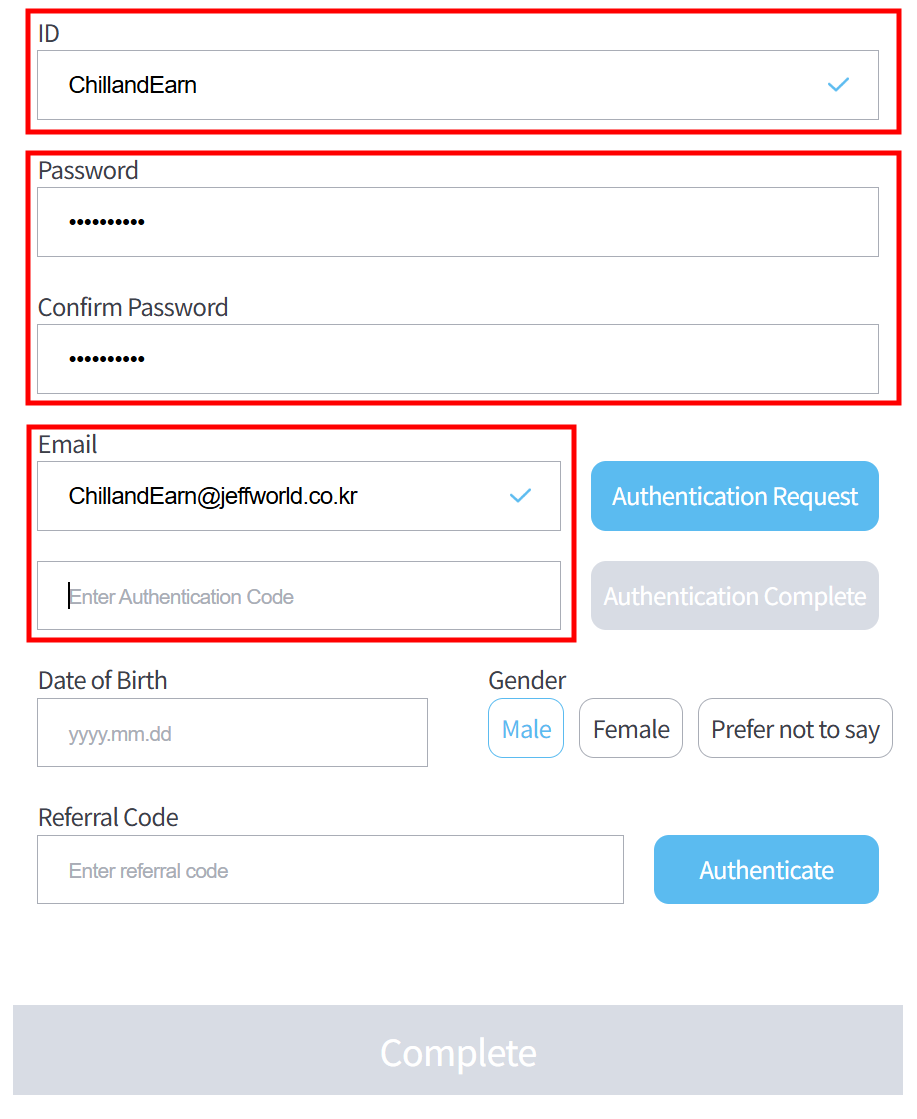
3. #### Enter Your ID and Password (Required)
**(For example**, when signing up with JEFF World (Method 1), you’ll see a registration window like the one below.) Enter your desired ID and password. Re-enter your password in the “Confirm PW” field. Please note that restricted words cannot be used in your ID or password.
4. **Enter Your Email and Click ****\[Authentication Request]**** (Required)**
A verification email will be sent to the email address you provide.
5. #### Enter the 6-Digit Verification Code
Check your email and enter the 6-digit verification code. Once the correct code is entered, the **\[Authentication Complete]** button will be activated. Click to complete your email verification.
6. #### Enter Your Date of Birth and Select Your Gender (Required)
Date of Birth must be entered in the format **yyyy.mm.dd** (e.g., April 9, 2025 → 2025.04.09).
7. **Complete the Registration**
Once all required fields are correctly filled out, the **\[Complete]** button will be activated.
8. **Save Your Owner Wallet Private Key**\
After completing the registration, your **Owner Wallet Private Key** will be displayed.\
⚠️ This will only be shown once. Please make sure to **copy and store it securely**.
> *Note: The Owner Wallet is used to create your JEFF Wallet and is not the actual wallet used within JEFF WORLD.*\
> *The address will differ from your JEFF Wallet (BASE) shown on your Mypage.*
## :video\_game: **JEFF World – System Requirements**
#### :small\_blue\_diamond: **Minimum Requirements**
* OS: Windows
* CPU: Intel i3 (6th Gen or higher) or AMD Ryzen 3
* RAM: 8 GB
* Graphics: Nvidia GTX 750 Ti / GTX 950 or AMD Radeon R7 370
* Storage: At least 5 GB of available space
#### :small\_blue\_diamond: **Recommended Requirements**
* OS: Windows
* CPU: Intel i5 or higher
* RAM: 16 GB or more
* Graphics: Nvidia GTX 1060 or higher
* Storage: 7 GB or more
**Welcome! 🌟 Welcome to JEFF World! 🎉**