# NPC

**Use the Navigation Icon to Find NPCs Easily!**

Finding NPCs in JEFF World is now **faster and easier** with the **Navigation Icon** next to the minimap!\
Follow the steps below to quickly locate any NPC. 🚀

## How to Use the Navigation Icon

1. **Click the Navigation Icon** next to the minimap at the **top-right** of the screen.

<figure><img src="https://1852379037-files.gitbook.io/~/files/v0/b/gitbook-x-prod.appspot.com/o/spaces%2FeWw0erbAIknFreBQzzHb%2Fuploads%2FhkmbzKnZ6KVTXWhmLzTg%2FGB_NPC1.png?alt=media&#x26;token=fadcb64f-219d-4f73-aac2-0f78a5a1d77f" alt="" width="509"><figcaption></figcaption></figure>

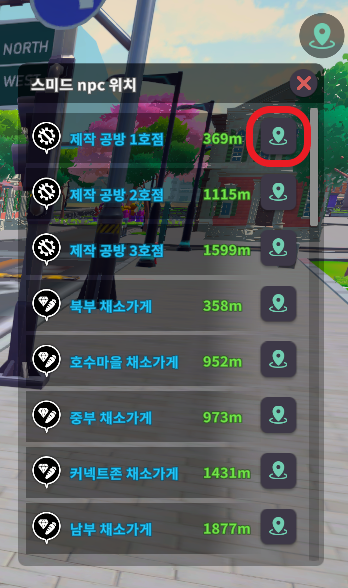
2. From the **NPC List**, click the **Navigation Icon** next to the NPC you want to find.
   * The list also shows the **distance** between your current location and the NPC.

<figure><img src="https://1852379037-files.gitbook.io/~/files/v0/b/gitbook-x-prod.appspot.com/o/spaces%2FeWw0erbAIknFreBQzzHb%2Fuploads%2FAITNf6oXGonIMA6JNBRR%2F2%EB%8B%A8%EA%B3%84.png?alt=media&#x26;token=107de710-3a37-4c2b-961f-c7d299d4619b" alt=""><figcaption></figcaption></figure>

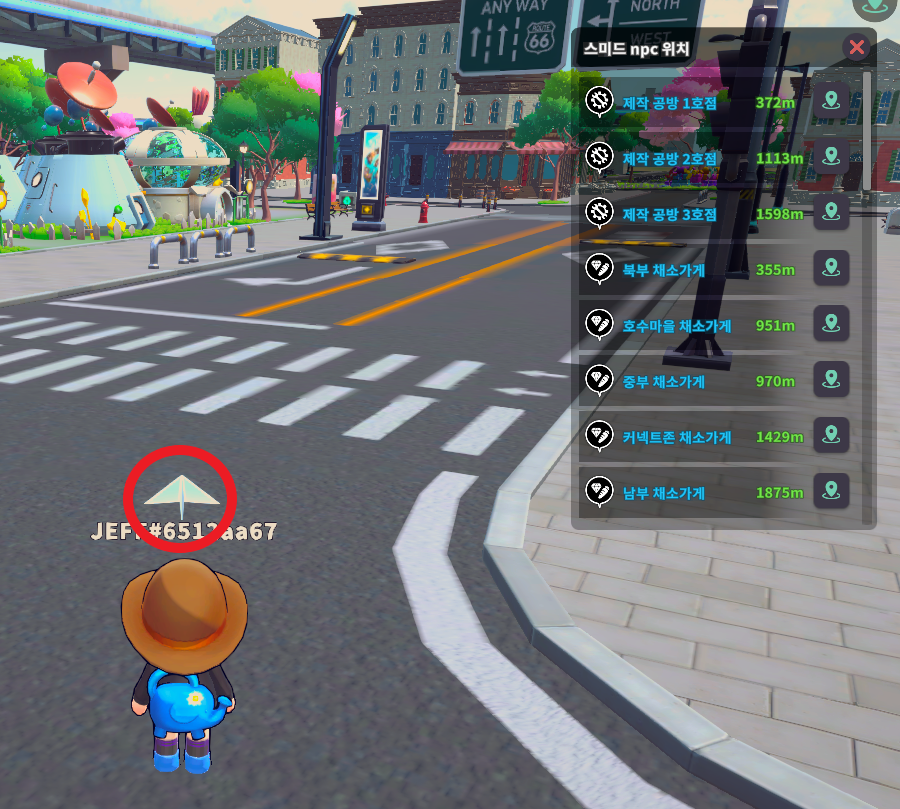
3. After selecting an NPC, a **paper airplane icon** will appear above your character’s head.
   * **Follow the paper airplane** to reach the NPC quickly and easily!

<figure><img src="https://1852379037-files.gitbook.io/~/files/v0/b/gitbook-x-prod.appspot.com/o/spaces%2FeWw0erbAIknFreBQzzHb%2Fuploads%2FsNfpHQspLT0rV2yJ56hH%2F3%EB%8B%A8%EA%B3%84.png?alt=media&#x26;token=6c907bcf-61ab-4385-9dd8-72c46a457ee0" alt=""><figcaption></figcaption></figure>

With this feature, navigating JEFF World is a breeze! ✨