# Chloe's Flea Market

**You can trade crystals and plants obtained through JEFF World activities in the JEFF Store to earn profits.**\
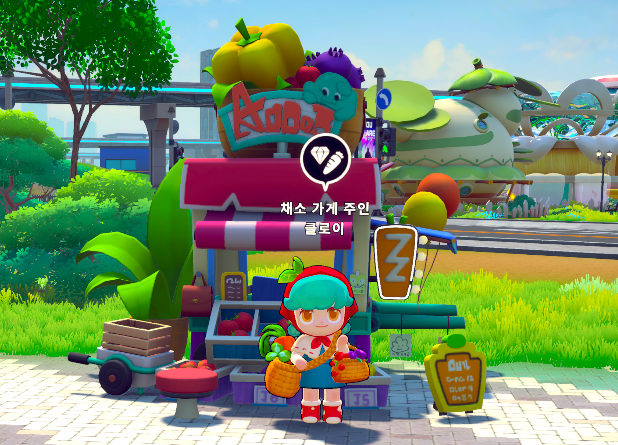
Item trading is handled through the NPC **Chloe, the Vegetable Shop Owner** (Find Chloe).

<figure><img src="https://1852379037-files.gitbook.io/~/files/v0/b/gitbook-x-prod.appspot.com/o/spaces%2FeWw0erbAIknFreBQzzHb%2Fuploads%2Ff0NS6WUA4IeZbi7XBDfN%2F066.png?alt=media&#x26;token=e4157073-1315-43fb-9c4f-2f71de036267" alt=""><figcaption><p>NPC; T<strong>he Vegetable Shop Owner</strong> Chloe</p></figcaption></figure>

## How to Use Chloe's Flea Market

### Before You Start

* To use Chloe’s Flea Market on the homepage, you need to register your <mark style="background-color:yellow;">**2nd Password**</mark> <mark style="background-color:yellow;"></mark><mark style="background-color:yellow;">in</mark> <mark style="background-color:yellow;"></mark><mark style="background-color:yellow;">**My Page**</mark><mark style="background-color:yellow;">.</mark>\
  ([See How to Register](https://jeff-world.gitbook.io/guidebook/introduction/how-to-play-jeff-world/broken-reference))\
  If you haven’t registered **2nd Password** yet, please do so 😊

### Steps to Use Chloe’s Flea Market:

1. **Find Chloe, the Vegetable Shop Owner.**

* Open the World Map (top-right of the screen) and click the location marker on the left to find Chloe.

<figure><img src="https://1852379037-files.gitbook.io/~/files/v0/b/gitbook-x-prod.appspot.com/o/spaces%2FeWw0erbAIknFreBQzzHb%2Fuploads%2FWYUaTbIGV6GCZkTsdx2V%2Fimage.png?alt=media&#x26;token=111d5702-cb63-45aa-b62c-46465405687c" alt=""><figcaption></figcaption></figure>

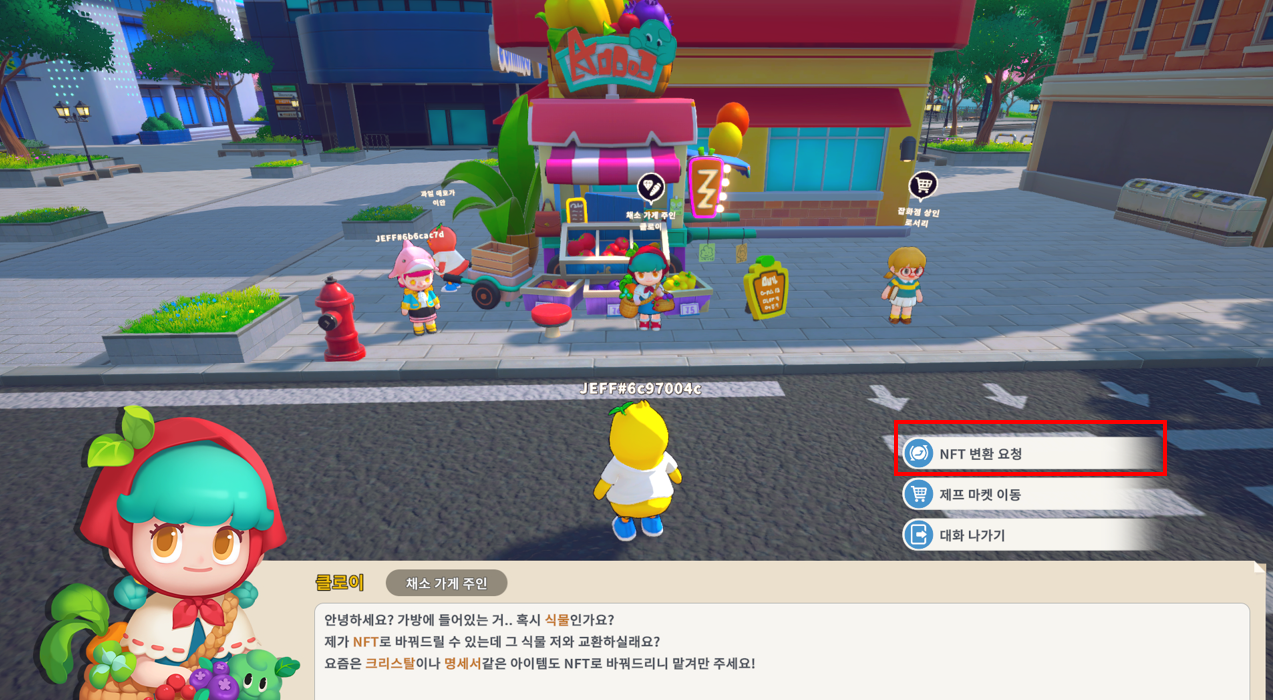
2\. **Request NFT Conversion from Chloe.**

* Chloe’s Flea Market only supports **NFT transactions**, so converting your items into NFTs is required.
* Blockchain transactions may take some time, so please be patient!

<figure><img src="https://1852379037-files.gitbook.io/~/files/v0/b/gitbook-x-prod.appspot.com/o/spaces%2FeWw0erbAIknFreBQzzHb%2Fuploads%2FEP6Dl3CfQGpX8v3pvhws%2Fimage.png?alt=media&#x26;token=3efb4d58-0a45-4145-bd9a-1ba2339c5124" alt=""><figcaption></figcaption></figure>

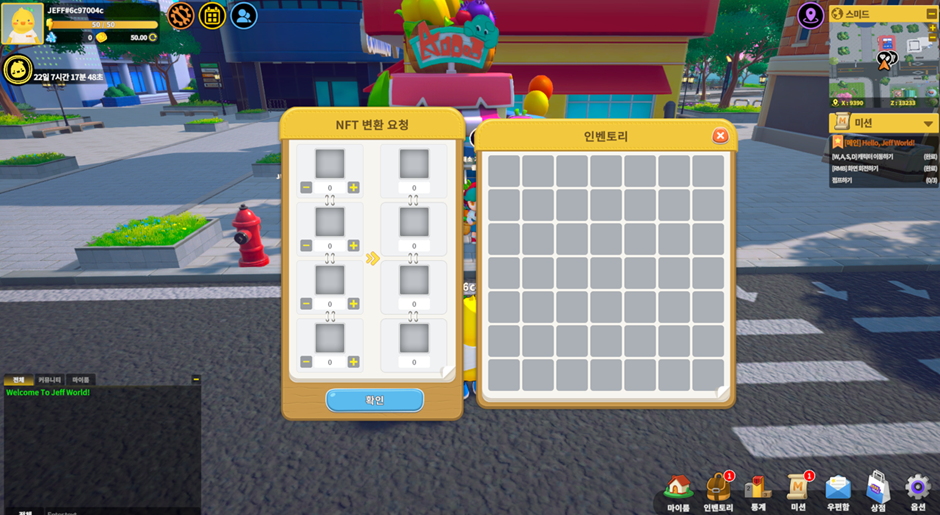
3\. Convert your crystals, plants, or other items into NFTs.

<figure><img src="https://1852379037-files.gitbook.io/~/files/v0/b/gitbook-x-prod.appspot.com/o/spaces%2FeWw0erbAIknFreBQzzHb%2Fuploads%2Fw6VZg6Igio1fKlPg4zrp%2Fimage.png?alt=media&#x26;token=f152a135-f913-428d-82fc-f6dd47d4bfe9" alt=""><figcaption></figcaption></figure>

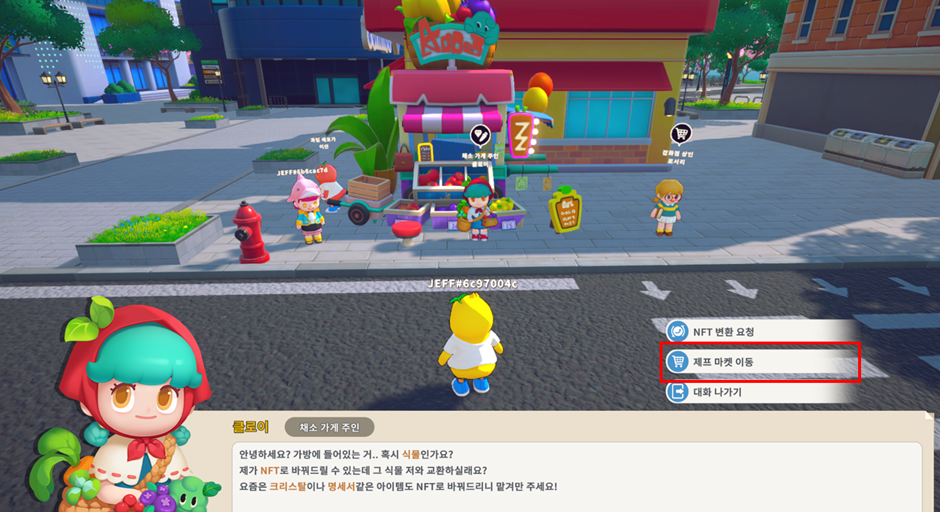
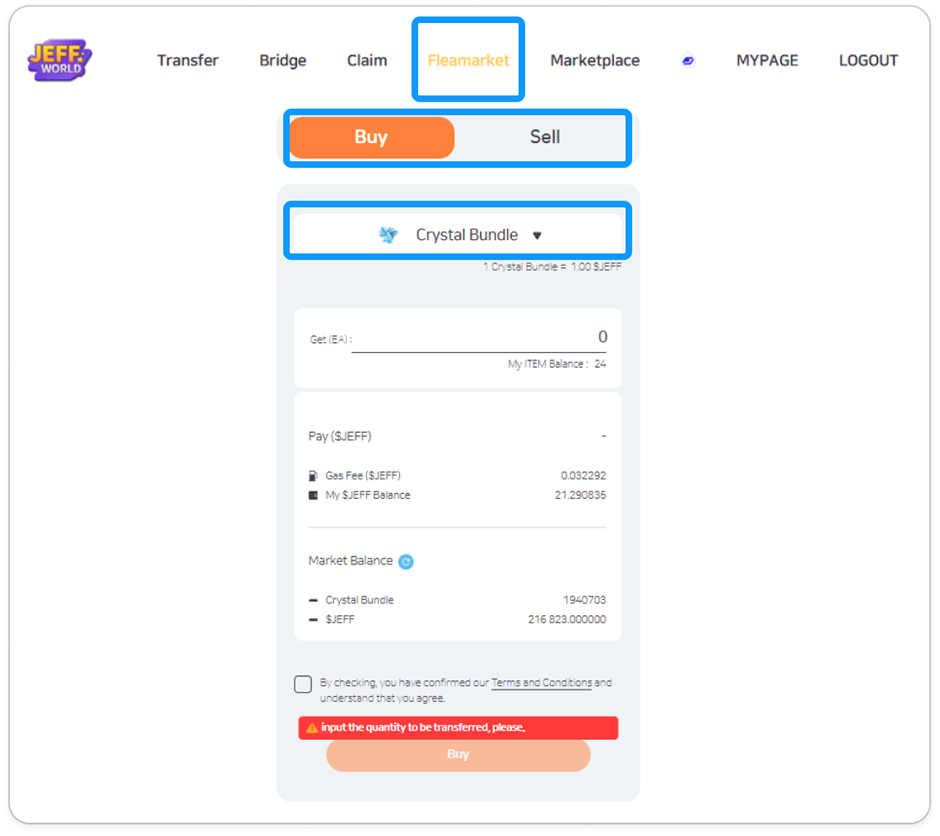
4\. **Visit the JEFF Fleamarket.**

* Click Chloe again to open the JEFF Market web page.

<figure><img src="https://1852379037-files.gitbook.io/~/files/v0/b/gitbook-x-prod.appspot.com/o/spaces%2FeWw0erbAIknFreBQzzHb%2Fuploads%2Fgky9ycZvbVZPZBVaQlpW%2Fimage.png?alt=media&#x26;token=97f4ed23-beb6-42b6-8546-a5733ab8d238" alt=""><figcaption></figcaption></figure>

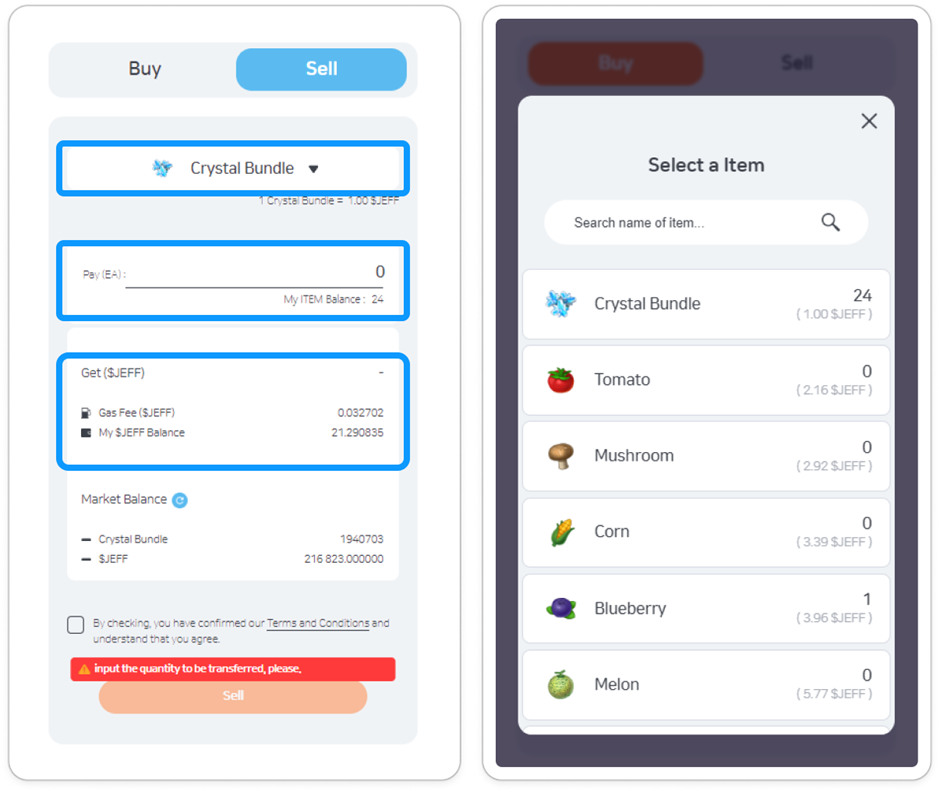
5\. **Sell Your NFTs in the Flea Market.**

* Go to the **Sell** tab and select the NFT you wish to sell.

<figure><img src="https://1852379037-files.gitbook.io/~/files/v0/b/gitbook-x-prod.appspot.com/o/spaces%2FeWw0erbAIknFreBQzzHb%2Fuploads%2FiceUined1XHocSYjkTX6%2Fimage.png?alt=media&#x26;token=4b786fbc-eb61-4025-928e-d9d096b60b9f" alt=""><figcaption></figcaption></figure>

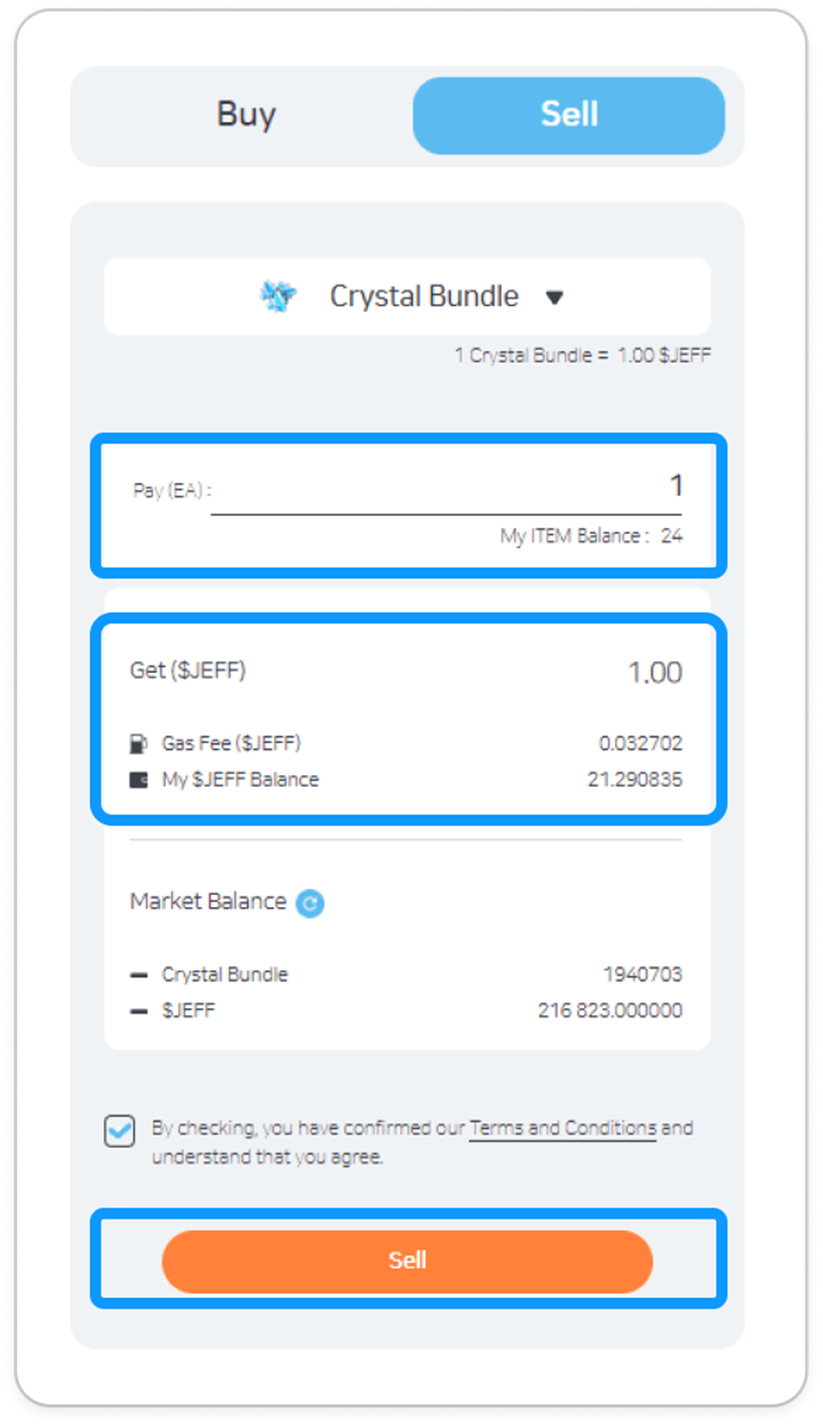
6\. **Enter the quantity to sell** and click the **Sell** button.

<figure><img src="https://1852379037-files.gitbook.io/~/files/v0/b/gitbook-x-prod.appspot.com/o/spaces%2FeWw0erbAIknFreBQzzHb%2Fuploads%2FDZnGRXDHQv50ahzI3iOK%2Fimage.png?alt=media&#x26;token=e70b1f38-2dbc-46ad-a359-30cc98e5120c" alt="" width="563"><figcaption></figcaption></figure>

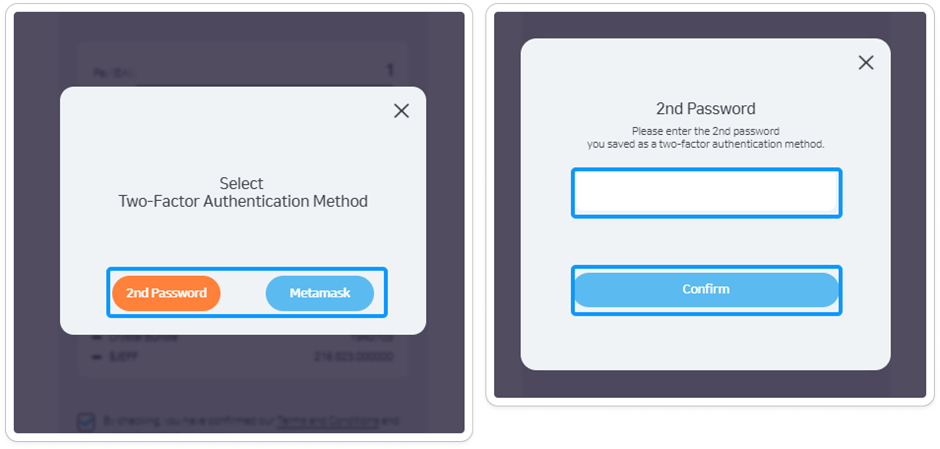
7\. **Authenticate the Transaction.**

* Choose the two-factor authentication (2FA) method you registered in [**My Page**](https://jeff-world.gitbook.io/guidebook/introduction/how-to-play-jeff-world/broken-reference) (e.g., secondary password).

<figure><img src="https://1852379037-files.gitbook.io/~/files/v0/b/gitbook-x-prod.appspot.com/o/spaces%2FeWw0erbAIknFreBQzzHb%2Fuploads%2FG8RA6u9BZuUVHaFDvzgE%2Fimage.png?alt=media&#x26;token=aeeb8882-f839-4296-a23a-bbab76a96099" alt=""><figcaption></figcaption></figure>

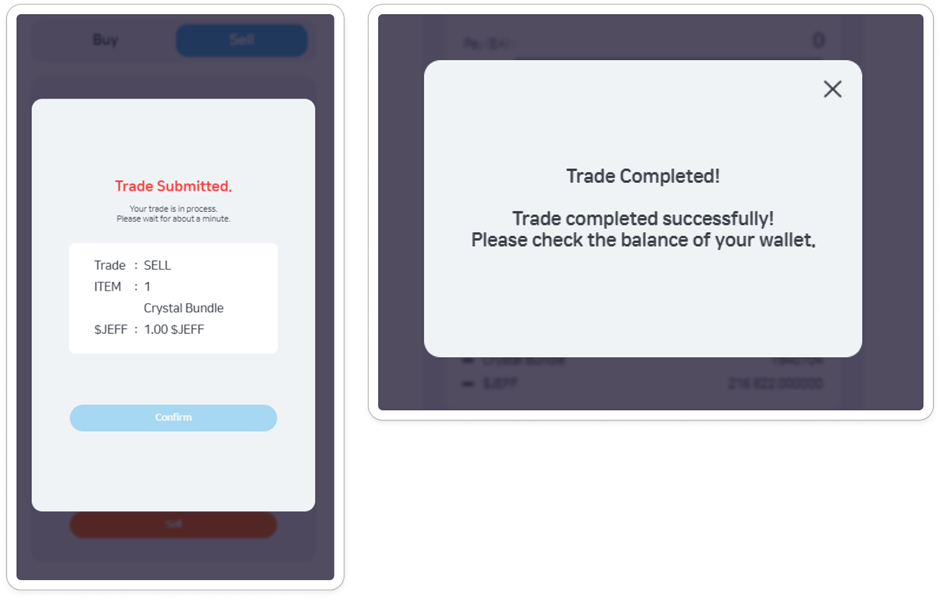
8\. **Confirm Your Information.**

* Review the details and click **Confirm** to complete the sale.

<figure><img src="https://1852379037-files.gitbook.io/~/files/v0/b/gitbook-x-prod.appspot.com/o/spaces%2FeWw0erbAIknFreBQzzHb%2Fuploads%2F5QPnrnHEsbCeJwRPyDB7%2Fimage.png?alt=media&#x26;token=5a7e4c4e-2980-44a1-9bb8-55ab00ac273f" alt=""><figcaption></figcaption></figure>

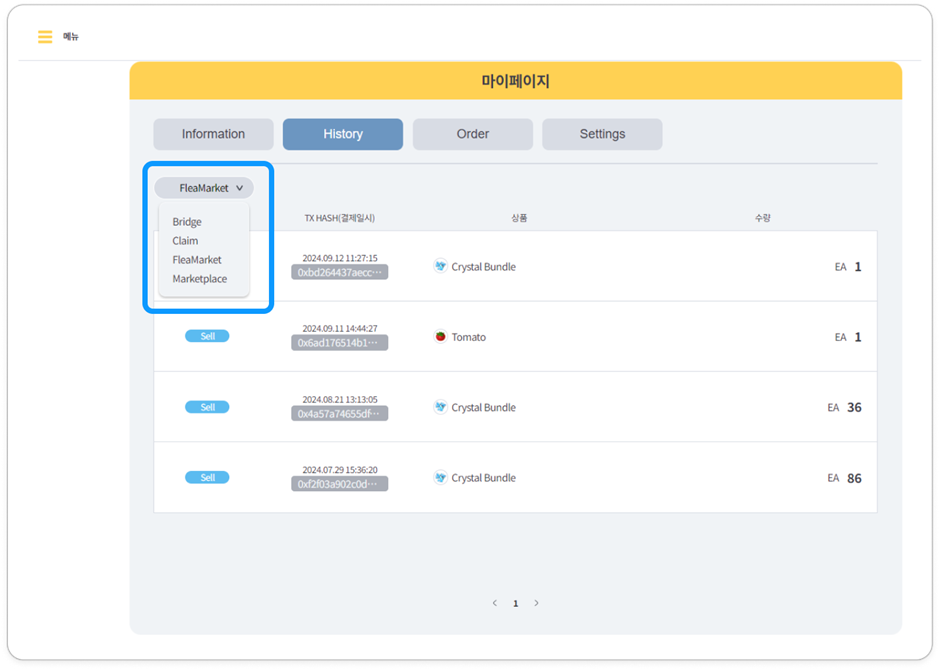
9\. **Check Your History.**

* You can review the NFTs you’ve bought or sold in the Flea Market by visiting the **History** tab in **My Page**.

<figure><img src="https://1852379037-files.gitbook.io/~/files/v0/b/gitbook-x-prod.appspot.com/o/spaces%2FeWw0erbAIknFreBQzzHb%2Fuploads%2FzDAUQZZVAKM0w4PtS47d%2Fimage.png?alt=media&#x26;token=f3bf5047-8af3-447a-88c1-fc05b5f82385" alt=""><figcaption></figcaption></figure>

## Trading Prices (Exchange Rates)

The exchange rate for crystals may change every Wednesday after regular maintenance.

* **5 Crystals = 1 JEFF**

The price of harvested plants remains stable.

* Note: To balance rewards, plant prices may be reviewed for potential adjustments in the future.